Sunday, August 19, 2012

Wirelessly Transfer Photos & Videos between iPhone, iPad, iPod and Computer with Wireless Transfer App

I have lots of great photos taken with my iPhone. I do want to transfer them to my computer. However, when I connected my iPhone with my PC via cable, what I found on my phone was countless folders, with several photos in each one. I didn't want to copy all the photos to my computer and then view them folder after folder. And it was really difficult to find a specific photo, let alone to organize and categorize them. In a word, I hate this way of transferring photos from my iPhone to my computer.

Transferring photos from PC to iPhone brings me big headache too. It seems that I can only get the pictures in one computer transferred. If I want to transfer photos from another computer to my phone, the photos previously downloaded to the phone will be erased. Besides, every time I start the transfer, I need to put the photos into a specific folder first. Otherwise, the photos that have previously been synced to my device will be erased too.

You will find it more complicated to transfer photos & videos from one iPhone to another, from iPad to iPhone, from iPhone to iPad, and such. It is just too troublesome to send & receive photos between two Apple devices via iMessage or Email. It is also inadvisable to exchange photos and videos among iPhone, iPad and iPod devices using iTunes, which, in my opinion, is so stupid and hard to use.

Having said all of the above, what on earth is the easiest and fastest way to transfer photos and videos among iPhone, iPad, iPod and computer? Actually, there are lots of Windows and Mac software tools on the Internet that work great for transferring files between computer and device. However, this kind of software tool usually costs 20-30 dollars and you need to download and install it to your computer. It just looks like an upgraded version of iTunes.

The iOS app named Wireless Transfer App caught my attention. I am fond of it so much that I will never use iTunes to transfer photos and videos from and to my iPhone once again. As its name indicates, this $0.99 app takes advantage of Wi-Fi network to transfer photos and videos between computer and device. With Wireless Transfer App, you can transfer photos and videos

From iPad to iPad
From iPad to iPhone
From iPhone to iPhone
From iPhone to iPad
From iPad to Computer
From iPhone to Computer
From Computer to iPad
From Computer to iPhone
...
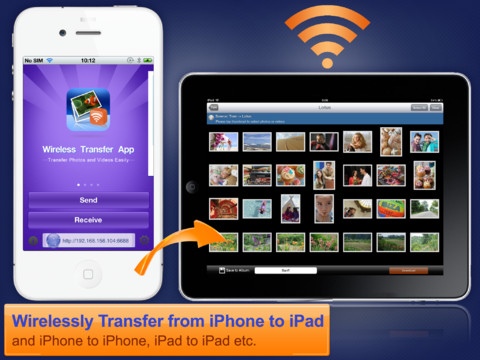
Wireless Transfer App

Wireless Transfer App makes transfer of your photos/videos from/to your computer as well as to your iPad, iPhone, iPod touch a breeze!

Wednesday, June 20, 2012

How to Show iCloud Photo Stream as a Slideshow on Apple TV

Want to show a quick slideshow to your friends and family of pictures contained within Photo Stream? Assuming you already have Apple TV signed into your iCloud account, do the following:

1. From the main Apple TV menu choose "Internet" and select "Photo Stream"
2. Choose "Slideshow" to start the slideshow

Apple TV Photo Stream Slideshow

By default this will go through all images contained within Photo Stream, that means every picture in the photos library of an iPhone and iPad, keep that in mind if you have pictures on any such device that you don't necessarily want to share.

Want to show photos in your iPad on HDTV?

Download the $1.99 iPad app Photo Slideshow Director HD to help you.

http://itunes.apple.com/us/app/photo-slideshow-director-hd/id457847244?mt=8

Photo Slideshow Director HD is a slideshow app that lets you use your iPad to organize your digital photos from camera roll, Picasa web albums, Facebook photo albums, Flickr photo sets and create eye-catching slideshow with music, transitions, theme, text, artclips, etc in minutes. It encodes photo slideshow into HD video for sharing on YouTube and Facebook or for playback on an even bigger screen of HDTV.

iPad photo slideshow

Sunday, June 10, 2012

Best Free iPhone Slideshow App Ever - Photo Slideshow Director 4.0

Photo Slideshow Director, developed by Shenzhen Socusoft Co., Ltd, is a wonderful app that offers a very nice way to save your memorable photos into videos and share them with others. This iPhone app helps you creat photo slideshows with background music, transitions, themes, texts and more. This app is available for free at the iTunes App Store for a limited time period. Why not save $1.99 by downloading it now?

Photo Slideshow Director is a slide show app that lets you use iPhone to organize photos, Picasa albums, Facebook photos, Flickr photo sets, music and create eye-catching slideshow. It lets you play the slideshow on HDTV with Apple Digital AV adaptor and HDMI cable or Apple VGA Adapter at hi-resolution of 1280x720, export the slideshow to HD video and even upload the slideshow video to YouTube and Facebook directly.

The wireless transfer function has been added to Photo Slideshow Director 4.0. Now you can easily access the slideshow movie via Wifi connection. When you open the wireless transfer dialog, you can save the movie file on desktop PC or play the video on your iPad, iPhone and other mobile devices.

best iphone slideshow app

Download Photo Slideshow Director from App Store >>

Sunday, February 19, 2012

How to create a slideshow on the Apple iPad

Thanks to a big display with 1024-by-768-pixel resolution at 132 pixels per inch (ppi), the Apple iPad is perfect for watching slideshows of your favorite photos.

To find out how to create a new slideshow, just follow our simple instructions:
  • Tap the Photos icon in the dock on the iPad home screen
  • Open an album or stack
  • Select Slideshow from the action button dropdown in the top right hand corner of the screen
  • You can opt to have music on or off and choose a song from your iTunes library
  • Next, choose a transition effect for transitions between photos
  • Tap Start Slidehsow and the slideshow will begin
To use the iPad as a digital photo frame that will automatically cycle through all of your photos, simply tap the slideshow icon in the bottom right corner of the iPad lock screen (to the right of "slide to unlock").

However, if you want to show your photos in a cooler way, it is recommended downloading the popular iPad slideshow app named Photo Slideshow Director HD from the iTunes app store.

Photo Slideshow Director HD

Here are some features of Photo Slideshow Director HD that I'd like to highlight:
  • Apart from photos from your iPad Photo Library, this app lets you import photos from Facebook photo albums, Picasa photo albums and Flickr photo sets as well.
  • You can add more than one song as the background music.
  • There are dozens of transitions available for your choice.
  • You can export the slideshow as an HD video, which can be easily transferred to your PC or Mac.
  • You can directly upload the encoded slideshow video to YouTube and Facebook.
  • The cool photo editor feature allows you to beautify each photo.
  • Directly stream the slideshow to HDTV for showing on its big screen
  • ...

Photo Slideshow Director HD for iPad Version 3.0 Released

Socusoft has updated its iPad app Photo Slideshow Director HD to version 3.0. New photo editing function has been added to the new version. With just a few taps, you can crop, rotate and flip the photo in slideshow, adjust the brightness, saturation and contrast, apply beautiful stylistic effects to photos, remove red eyes, add text or drawing on photos and more. All these photo editing features will make your slideshow amazing.

Photo Slideshow Director HD is an excellent photo slideshow app that lets you use your iPad to organize your digital photos from camera roll, picasa web albums, Facebook photo albums, Flickr photo sets and create eye-catching slideshows in minutes. It exports slideshows to HD videos for sharing on YouTube and Facebook or for playback on an even bigger screen of your HDTV.

Photo Slideshow Director HD

Key Features of Photo Slideshow Director HD
  • Make photo slideshow on iPad easily.
  • Export slideshow to HD movie.
  • Make music video for your favorite songs easily.
  • Support Picasa, Facebook and Flickr web album.
  • HD full screen slideshow presentation.
  • Ready for TV output with Apple Digital AV Adaptor or Apple VGA Adaptor.
  • Support RAW image format and big size images imported with Apple iPad Camera Connection Kit.
  • To make a photo slideshow, this app is faster than iMovie. With the encoded video, you can import to iMovie for further editing.
  • Mirror slideshow to HDTV directly via AppleTV AirPlay (with iOS 5.0 and iPad2).
  • Powerful yet easy to use photo editor.
What's New in Version 3.0
  • Added a new photo editing function. Now you can apply effects, crop, rotate, enhance photo, adjust brightness, sharpness and remove red eyes with built-in photo editor.
  • Project icon can be changed.
Pricing and Availability

Photo Slideshow Director HD for iPad Version 3.0 ( http://itunes.apple.com/us/app/photo-slideshow-director-hd/id457847244?mt=8 ) is only $2.99 USD (or equivalent amount in other currencies) and available worldwide exclusively through the App Store in the Photo & Video category.

Tuesday, February 14, 2012

Socusoft Brings Advanced Photo Editing Features to Photo Slideshow Director 3.0 iPhone App

Socusoft, a leading software company specialized in Photo Slideshow, Flash Slideshow, Video Conversion, Web Video Player, etc. around the world, announces Photo Slideshow Director 3.0 (previously named Slideshow+) and brings a lot more advanced photo editing features to the newest version of this popular iPhone app.

Featuring lots of dynamic transition effects and theme styles, Photo Slideshow Director lets you use your iPhone to organize your digital photos from camera roll, Picasa web albums, Facebook photo albums, Flickr photo sets and create eye-catching slideshow in no time. It also allows you to export slideshows to HD videos for sharing on YouTube and Facebook or for playback on an even bigger screen of HDTV.

There are lots of powerful photo editing options embedded into Photo Slideshow Director 3.0. Now in this version, you will be able to edit each single photo, such as cropping (custom sizes and standard print sizes), adjustments of brightness / contrast / saturation / sharpness, flip or rotate the photo's orientation, red-eye removal, teeth whitening, and blemish removal as well as more advanced effects like auto-enhance, night-enhance, and the ability to draw or add text to the image.

Photo Slideshow Director 3.0

Key Features of Photo Slideshow Director 3.0

1. Encode photo slideshow to HD MP4 movie at a very high speed with super quality.
2. Directly upload slideshow to YouTube or Facebook.
3. Make slideshow from Picasa, Facebook and Flickr web albums easily.
4. Add background music to the slideshow.
5. Feature lots of transition effects and theme styles.
6. Editing features such as add text narration, insert blank images, set transition duration and photo duration, sync music, etc.
7. All photos are processed with highest quality settings and played with best result.
8. Powerful yet easy to use photo editor.
9. Photo Slideshow Director is ready for playing slideshow on HDTV directly.

What's New in Version 3.0

1. Added photo editing function. Now you can crop, rotate and flip the photo in slideshow, adjust the brightness, saturation and contrast, apply beautiful stylistic effects to photos, remove red eyes, add text or drawing on photos.
2. Improved subtitle editing function
3. Added launch image

Device Requirements

* iPhone, iPad and iPod touch
* Requires iOS 4.0 or later
*14.2 MB

Pricing and Availability

Photo Slideshow Director (Slideshow+) for iPhone 3.0 ( http://itunes.apple.com/us/app/slideshow-photo-to-movie-music/id462690585?mt=8 ) is only $0.99 USD (or equivalent amount in other currencies) and available worldwide exclusively through the App Store in the Photo & Video category.

Monday, February 6, 2012

Slideshow+ turns photos to movie with music on iPhone with ease and speed

Slideshow+: Photo to Movie with MusicSocusoft Studio has upgraded its iPhone app Slideshow+ to version 2.6. The app logo has also been updated and the app name has been changed from Slideshow+ to Slideshow+: Photo to Movie with Music as well. Meanwhile, the price of Slideshow+ has dropped from $1.99 to $0.99.

With Slideshow+, you can easily turn photos from your iPhone Camera Roll, Picasa albums, Facebook photos, Flickr photo sets into dynamic slideshow movie with your favorite music and lots of dynamic transition effects. You can export the slideshow to HD video or play the slideshow on HDTV with Apple Digital AV adaptor and HDMI cable or Apple VGA Adapter at hi-resolution of 1280x720. Slideshow+ also lets you upload the slideshow to YouTube and Facebook directly. It's an ideal tool for you to share your photo masterpiece with family and friends on bigger HDTV screen with iPhone. It is also a great iPhone app for you to present your business photos quickly and easily.

Key Features of Slideshow+ Version 2.6

1. Export to HD movie

Encoding photo slideshow to HD MP4 movie at a very high speed with super quality. With the slideshow video saved in Camera Roll, you can export to your PC, copy to USB and plugin HDTV's USB port and play. You can also share with your friends by sending to YouTube, Facebook etc. With AppleTV, you can Airplay the slideshow video on TV.

2. Make slideshow from Picasa,Facebook,Flickr web albums easily

If you have Picasa web alum, photos on Facebook or Flickr photo sets, Slideshow+ can build an attractive slideshow directly from your album photos in minutes. Just with a few taps.

3. Make photo slideshow video on iPhone easily

With taps and drags on iPhone, you can turn your photo collections, Picasa photos,Facebook photos,Flickr photos and music into live and dynamic slideshow with ease. With slideshow themes, you just need to add photos and music then your slideshow is ready for showing. You can also add text narration, insert blank images, adjust transition effects to customize slideshow.

4. HD full screen slideshow presentation

Slideshow+ is designed to show the best quality of your photos, all photos are processed with highest quality settings and played with best result.

5. Ready for HDTV output

Slideshow+ is ready for playing slideshow on HDTV directly. Just connect your iPhone and HDTV with Apple Digital AV adaptor and HDMI cable or Apple VGA Adapter and the slideshow will be mirrored on HDTV bigger screen with hi-resolution of 1280x720. Your photos will looks great with highest quality on big TV screen.

Slideshow+ Screenshot

Exclusive Features of Slideshow+
  • More than 60 attractive dynamic transition effects for slideshow
  • Export to 720p HD photo music video at very high speed and quality
  • Import Picasa, Facebook and Flickr web albums photo and make a slideshow with a few taps
  • Take photos and make instant photo slideshow on the go
  • Play Hi-resolution slideshow on HDTV using Apple Digital AV Adaptor or Apple VGA Adapter
What's New in Version 2.6
  • Theme can be customized by changing background image
  • Improved the subtitle and text editing function
  • Add more background images
  • Fixed the screen ratio bug while connected with HDTV
Requirements, Availability and Pricing

Slideshow+ is compatible with iPhone 3GS, iPhone 4, iPhone 4S, iPod touch (3rd generation), iPod touch (4th generation) and iPad. It requires iOS 4.1 or later. Slideshow+ is available at the Photo & Video category on the iTunes app store at http://itunes.apple.com/us/app/slideshow-photo-to-movie-music/id462690585?mt=8 and it costs only $0.99 (Reg. $1.99) to download.